Bookselling Tools: ActiveWords

One of the most mind-numbing chores of selling vintage books online is typing the descriptions. Though each book has individual high-lights and flaws that need to be enumerated, for the most part a bookseller is drawing on a handful of phrases again and again. Any way to speed this up means you make more money, and have more time away from the monitor (unless you blog of course).

I’ve found a program that helps me write descriptions much more efficiently (without skimping on the detail either). It’s called ActiveWords. It’s a macro writer and organizer that lets you create short letter/number sequences to substitute text, open programs, and perform a number of other useful tasks.

Here are a few basic shortcuts that I use constantly:

  • typing “home” + F8 (my AW activation key) inserts my home address into any text field
  • “store” + F8 inserts my office address and a Googlemaps link
  • “inv” + F8 inserts my invoice template

For book descriptions I have hundreds of macros:

  • mrw — Moderate reading-wear
  • tan — Pages lightly age-tanned but clean and supple
  • bump — Light bumping to corners and spine edge
  • dust — Top page edge shows dust discoloration
  • pulp — Attractive, vintage mass market/pocket paperback with colorful [ ] painted cover art. Cover is bright with [ ]. Pages faintly edge tanned, but supple. Binding solid. Cover copy reads:

etc, etc.

Setting up ActiveWords is a gradual, evolving process. Whenever you use a phrase repetitively, enter it in ActiveWords. Change it when it isn’t useful and review your phrases every once in a while to see what you’ve forgotten about or don’t use anymore.

The program is affordable and you can purchase additional discounted licenses for your laptop or employee machines. There’s a 60-Day free trial available here. There’s at least one Mac equivalent to AW and probably a few competing PC utilities but I haven’t done a comparison.

Anybody have any other time saving programs for the bookseller? I’d love to hear about them.
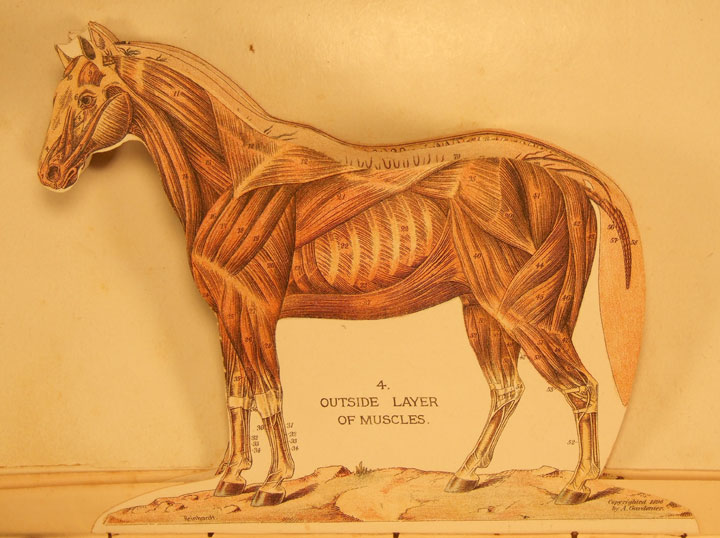
Paper Engineering "Manikins"

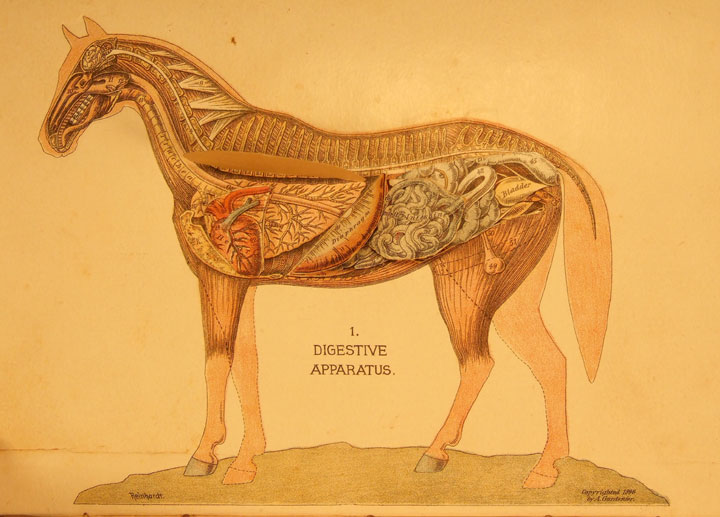
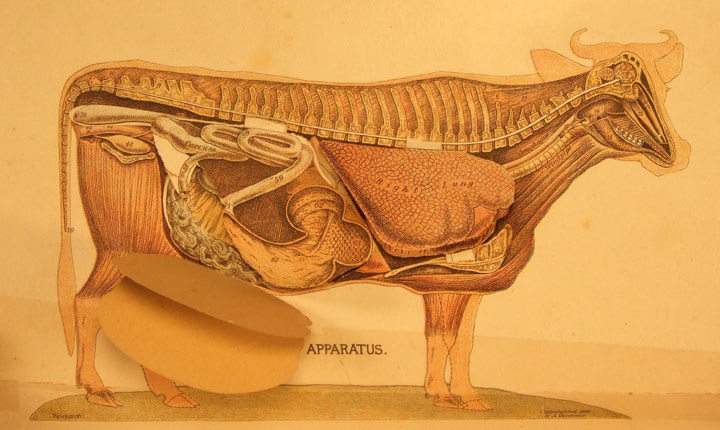
Here are a few images from the Hand-Book of Ready Reference, edited by Andrew A. Gardenier (published by King-Richardson Publishing Company, Springfield Mass, 1897). This is an agricultural reference book with paper-engineering anatomical inserts called “Manikins” of a horse, a cow and a fetlock.


(Click on the images to enlarge.)

The horse and the cow each have five layers, the bottom layer bears several, overlapping, hinged, innard pieces.

Very cool. The prize of my pop-up collection. I have the salesman’s dummy version, but I don’t think the full text contains any more “Manikins” so I can live without the extra three inches of agricultural info.

Depression-era Broadside

Just found this Depression-era, anti-New Deal broadside/handbill entitled “Women of America, Wake Up!” in the “Handy Edition” of the Encyclopedia Britannica, 11th Edition that I’m slowly restoring.


and larger here.

It was produced by the Women’s Rebellion, Suffern New York, Rockland County, Sarah Oliver Hulswit (Chairman).

“Pump-priming” referred to Roosevelt’s New Deal programs “including social security, workman’s comp, the Writers Project, and the like…plus extensive programs of public works (Hoover Dam; Grand Coulee Dam; the Tennessee Valley Authority, Lone Star Lake Dam in Douglas County, Kansas, etc)” (adapted from here)

Alright I was backlogged but that’s it for today.

1948 Chinese Opera Theatre Ticket

I just found a January 25, 1948 ticket to the Canton theatre (75-85 East Broadway, New York) used as a bookmark.

According to theater buff Damien Farley at CinemaTreasures.org the Canton:

Opened as a home to both Yiddish vaudeville and motion pictures in 1911, the Florence Theatre, the exact address of which was 75-85 East Broadway, ended its existence as the Sun Sing in 1993.

By 1942, the theatre had been rechristened the New Canton Theatre and featured performances of Chinese opera and variety acts. In 1950, the facility was again re-dubbed, this time as the Sun Sing Theatre, and took to exhibiting Chinese language films, sometimes with English subtitles.

In 1960, the theatre was scheduled for demolition when faced with the addition of an upper deck to the Manhattan Bridge far above. However, city engineers were able to save the theatre and the adjoining retail space, through the use of innovative bridge supports which only caused the theatre’s seat count to be reduced, this time to 676.

In 1972, the theatre began to feature a mixed program of film and stage performances. It finally closed in 1993.

Here’s an image from the theater’s later days. I love the way it’s nestled under the bridge.


I can’t find a rundown of what might have been playing on that particular evening in 1948, but here’s a Chinese Opera mask, just cause it’s cool.

Philip Dick in Croatia

I recently sold a 1st of Philip Dick’s Do Androids Dream of Electric Sheep to a buyer in Central/Eastern Europe. Along with his payment he sent a letter requesting that I send the book unregistered otherwise he would end up “standing around for three hours in a Croatian customs shed”.

Would that not be the full Philip Dick experience? and maybe Kafka-too while you were at it?

Who’s Afraid of Google Books?

Google recently added 12 more libraries to their omnivorous scanning maw (despite two pending lawsuits). As a researcher and a penny-pinching reader this makes me very happy. As a bookdealer and peddler of rare information, this makes me fear for my (already spotty) future earning potential.

I’m fairly sure that Google’s project will destroy the market for many mid-high priced scholarly titles (particularly the ones that are only needed to check a footnote or two). And I’m absolutely sure that checking if a book has been “googled” yet will become a regular part of bookscouting. On the other hand if a buyer can use Google Books to confirm that a title is desirable to them (rather than buying blind), they might be more likely to pay a decent price for it.

First editions and books as artifacts/fetish objects should hold their value. And the comparison shopping potential, and expanded market created by online bookselling should drive the premium and one-of-a-kind items even higher. This should be more of a focus for me in the future.

So far the only thing I’ve used Google Books for was to replace a missing page from a rare, early 20th century mystery novel. It hasn’t done me wrong…yet.

Trash Alchemy

A friend called me Sunday to tip me off about two large boxes of books being curbed nearby. That always gets the juices flowing, so I thought I would post a salvage report describing my technique for squeezing the last dollar from someone else’s garbage.

When I got to the books minutes after the call there was already another browser, but she was nearly done. I started sorting and putting aside dirt common or truly unsellable books but there weren’t many, so I just sealed up both boxes and brought them home before more vultures started circling (Is there a scavenger that drags the whole carcass back to its den to feast in safety? If so, that’s my spirit animal.).

The majority of the books were recent and in barely used condition. I turned on my bar code scanner and went to work. There were thirty titles that I added to my FPV inventory (Amazon, ABE, Alibris, etc). Most were priced in the $4-8 dollar range–which I normally don’t bother with–but they were free. There were a few outliers priced between $50-150 but I can’t say that they will ever sell. All told I added about $350 worth of books to my inventory.

Once those were listed, I was left with about 50 “penny” books ($.02-$3 used on Amazon). Some booksellers will list these (if they weigh 1 pound or less) and try to make at least $.80 on Amazon’s shipping credit, but the stacking and packing would drive me to violence, so I don’t bother. What I will do though is collect common books into interest lots to auction on eBay.

I keep a text file of my lots in progress. Once I’ve added a book’s details, I toss it into a box and forget about it until I have a decent-size list. When the time comes, I insert the new titles into a recycled Turbolister entry, weigh the books for calculated shipping, take pictures, and upload on Sunday evening. These lots frequently go for my minimum bid (so I set my prices accordingly) but sometimes I get a welcome surprise.

Some lots that I’ve had consistently good luck with are: pulp era paperbacks with suggestive covers; gay/lesbian fiction and non-fiction; single author or series collections; animal books (horses, pigs, mice, etc); New Age/Wicca; westerns, and many more.

After those two passes, I had about 40 books left that I couldn’t find a “hook” for. At this point I pull out books that are suitable for a used bookstore. Make sure they are in saleable condition and screen out the heavily marked, dirty, torn, or out of date titles (the book buyer won’t give you as much $$ if you overwhelm them with crap…and if you do it consistently, they will remember you). Ask the buyer for credit instead of cash as most stores will give 30%-50% more in credit. If the bookstore doesn’t sell online, scoutpal a few titles. If they do sell online, look for flashpoints they may have overlooked: 1st printings of popular fiction, autographed copies, collectible mass markets, etc. If you can’t find anything to resell, find something you want to read, or better yet find business or reference books for your bookselling library.

When I was done at the used bookstore, I had 15-20 titles left. I walked these down to the Salvation Army/Goodwill and made a donation. I got a receipt and a write-off come tax time.

Left with an empty cart and box, I went back to Sal’s book rack and started all over.

eBay Unpaid Item Phishing Scam

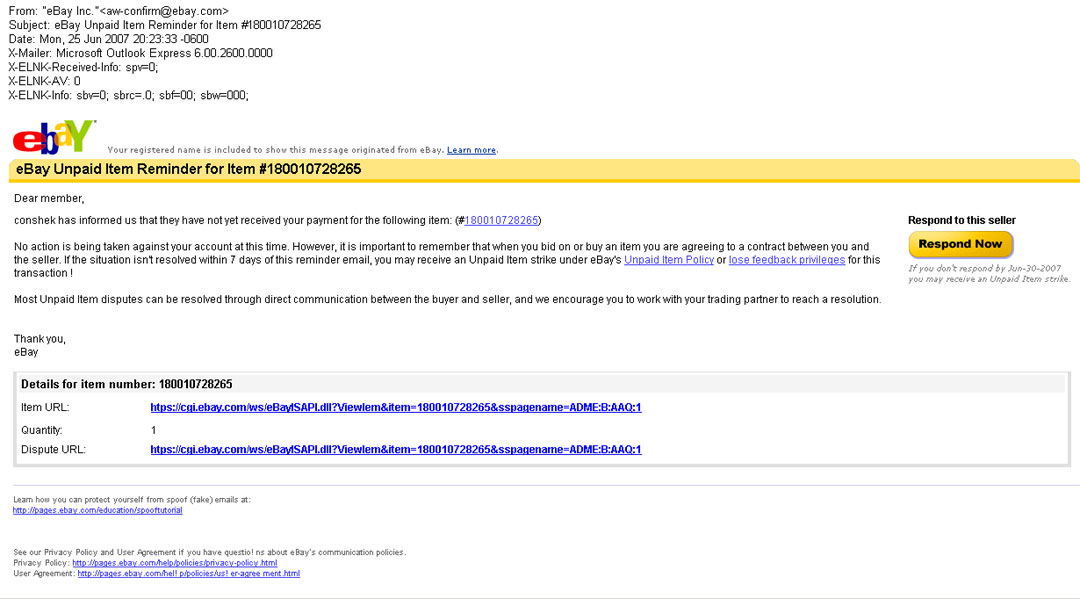
Just woke up to find a new eBay phishing email in my inbox. It’s a falsified UNPAID ITEM REMINDER. Haven’t seen this one before:

Checking a UK-based anti-phishing site called MillerSmiles (which seems very handy), it looks like this scam was first reported this April.

Most people with internet businesses should know to never click on an unfamiliar link, even–actually ESPECIALLY–if the source appears legit. You should alway cut-and-paste the link into your browser (and NEVER enter your password information), or better yet, try to search the information independently on the supposed originating site (in this case I just looked on the MY EBAY page to see that no dispute had been opened against me and that the item number was inauthentic).

Since I’ve never received an unpaid item reminder, and don’t know what the real deal looks like, this scam had the potential to hook me if I didn’t always follow the above principles.

I wonder if any scammers are actually buying low dollar items and then sending falsified total requests/shipping questions/etc to the seller? That might get me….but scammers are probably too cheap for that, and it would leave a bigger trail.

Bosun’s Shelf

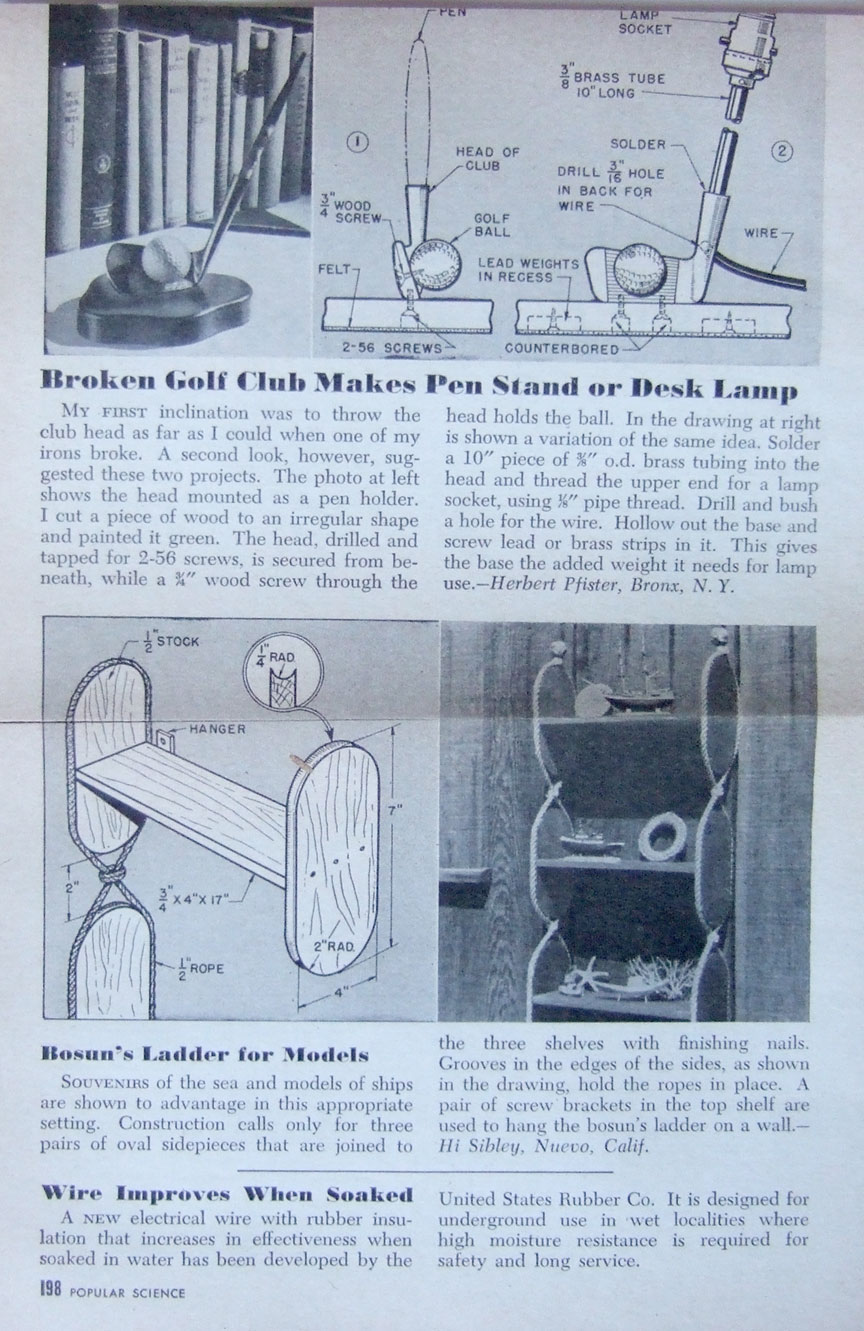
Found this plan for a bosun’s shelf layed into a Popular Science collection of Wood Carving and Whittling projects.

full plan here.

Fairly simple. And an attractive way to display nautical-themed tchotchkes.

Also includes a brief plan for making a broken golf club into a pen-stand or a lamp.